Sending Feedback
Report a bug or suggest an improvement to the Qurannotate team.
TL;DR
Open Contact Us from the dashboard, or the feedback option in the Qur'an header, to send the team a message — optionally tagged by category — of up to 1000 characters. You can also email the team directly at salam@qurannotate.com.
Found a bug or have an idea? You can send it straight to the Qurannotate team, and they read every message.
How to Send Feedback
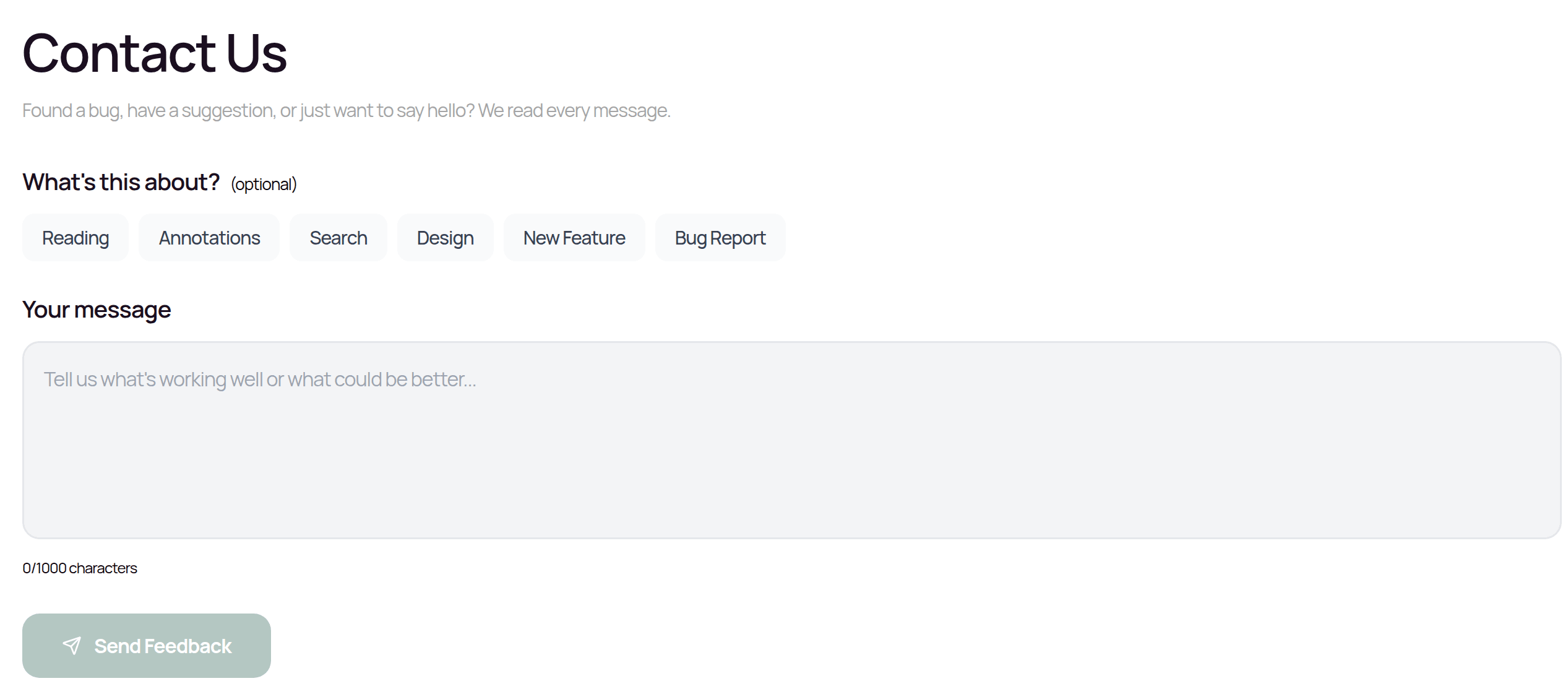
Open Contact Us from the dashboard, or the feedback option in the actions menu in the Qur'an header. The Quick Feedback box opens. Optionally tap a category — Reading, Annotations, Search, Design, New Feature, or Bug Report — then type your message (up to 1000 characters) and tap Send Feedback.
Try to be specific: mention what you were trying to do, what happened, and what you expected to happen instead. You can also email the team directly at salam@qurannotate.com.
The more detail you give, the faster the team can understand and fix the issue.
Related Articles
Was this helpful?
Ready to annotate the Qurʼān?
Qurannotate is free to start — no sign-up required on web.