What You Can Annotate: Verses, Words, Surahs and Pages
Learn the four levels you can annotate and when to use each.
TL;DR
You can attach notes at four levels — verse, word, surah, or page — and each level opens its own canvas with its own separate notes and highlight. You pick the level by where you tap: a word, a verse's end-of-verse marker, the surah name banner, or the Page button.
Last updated 27 September 2026
You can attach notes at four different levels, each suited to a different kind of study. Choosing the right level keeps your work organised and easy to come back to.
- —Verse (ayah) — reflections, tafsir points, or questions on a single ayah.
- —Word — a meaning, root, or grammar note on one specific word.
- —Surah — a theme, summary, or overview for a whole surah, attached to the surah title.
- —Page — anything that applies to the whole page rather than one verse.
You choose the level by where you tap: a word opens a word note, the end-of-verse marker (the last symbol of a verse) opens a verse note, the surah's name banner opens a surah note, and the Page N button in the header opens a page note. In an Ayah by Ayah mushaf, tap the verse's box outside the words for a verse note. An infinite canvas opens for that exact spot, and each level keeps its own separate notes and its own highlight.
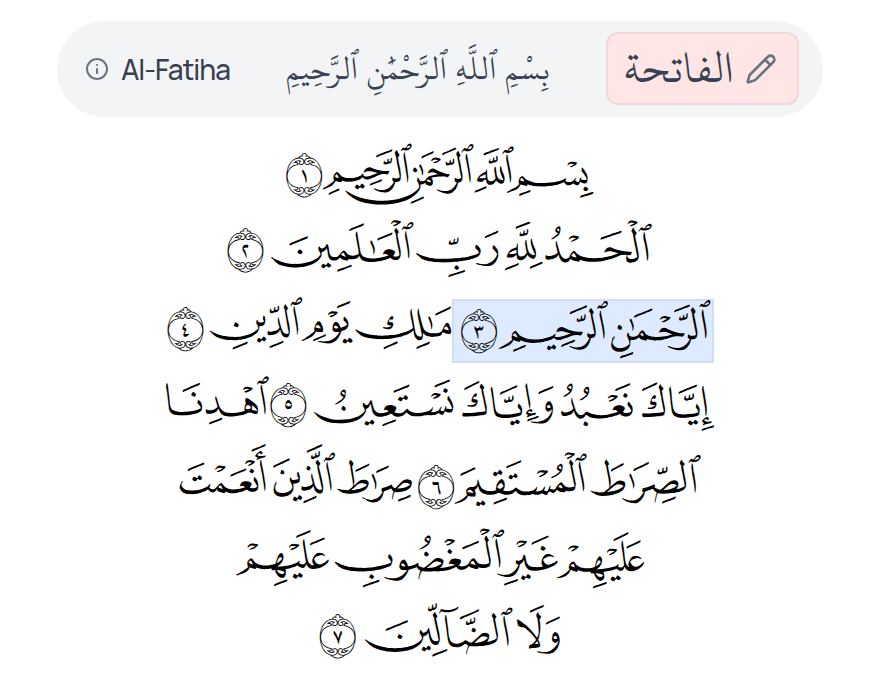
Use word-level notes for language study, and verse or surah-level notes for reflection and tafsir.
Related Articles
Was this helpful?
Ready to annotate the Qurʼān?
Qurannotate is free to start — no sign-up required on web.