Listening to recitation and choosing a reciter
Play recitation, choose a reciter and control playback while you read.
Last updated 27 September 2026
Recitation is available in all Qur'an mushafs (not in notebooks).
Play recitation
Open a mushaf and go to the page you want.
Tap the speaker button (Listen to recitation) in the header.

Playback starts from the first verse on the page.
While audio is playing, the header shows Previous verse, Play/Pause, Next verse, Audio settings (the gear) and Close audio player.
Audio settings
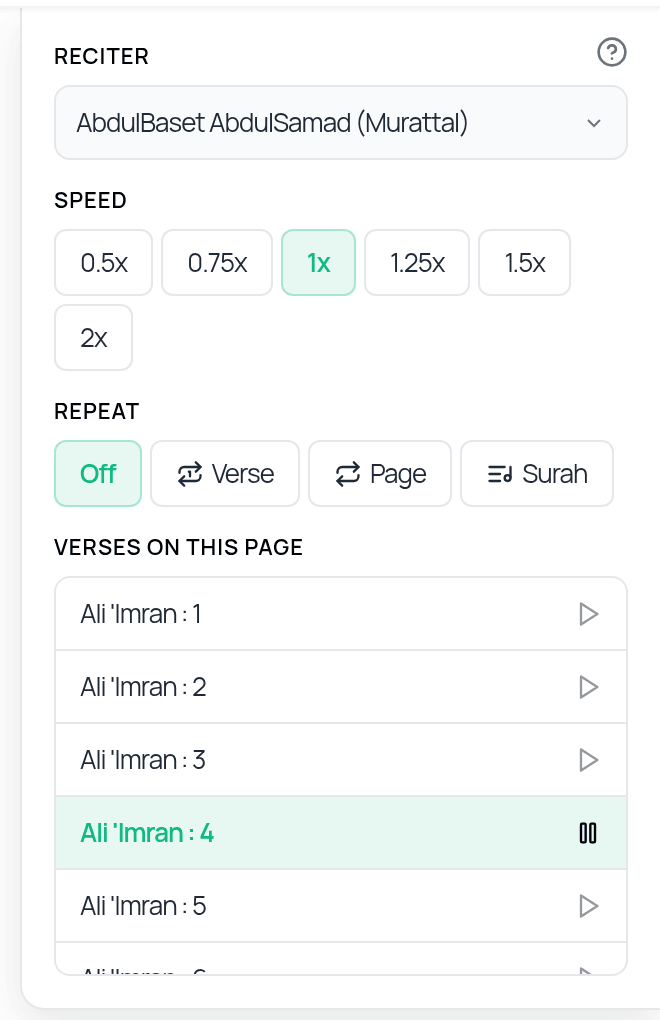
Tap Audio settings (the gear, shown once audio has started) to open:
- —Reciter: choose from a list of reciters. The default is AbdulBaset AbdulSamad (Murattal). Others include Ahmad Al-Nufais, Maher Al-Muaiqly, Saad Al-Ghamdi, Yasser Ad-Dussary and Khalifah Al Tunaiji, plus many more. Your last choice is remembered on that device.
- —Speed: 0.5x, 0.75x, 1x, 1.25x, 1.5x or 2x.
- —Repeat: Off, Verse, Page or Surah. With Off, playback stops after the last verse on the page.
- —Verses on this page: tap a verse to play from it.
If you change the reciter while audio is playing, the current verse restarts in the new voice.
Good to know
- —Recitation streams online and needs an internet connection.
- —To start from a particular verse, start playback, open Audio settings, and tap the verse under Verses on this page.
Audio not playing?
- —Check your internet connection.
- —On iPhone/iPad, check the silent switch/volume and that no other app is holding the audio.
- —Close the audio player and tap the speaker again, or try another reciter.
- —If a browser blocks audio, click once on the page and try again.
- —Still stuck? Email salam@qurannotate.com with your device, app version and the reciter you chose.
Related Articles
Was this helpful?
Ready to annotate the Qurʼān?
Qurannotate is free to start — no sign-up required on web.