Contacting support and sending feedback
Email the team, send feedback from the app, or report a bug.
Last updated 27 September 2026
Email the team at salam@qurannotate.com. If your question is about your account or billing, write from the email address on your Qurannotate account. You may also see support@qurannotate.com in some parts of the app and on the policy pages. That is also a Qurannotate address.
Send a message from inside the app
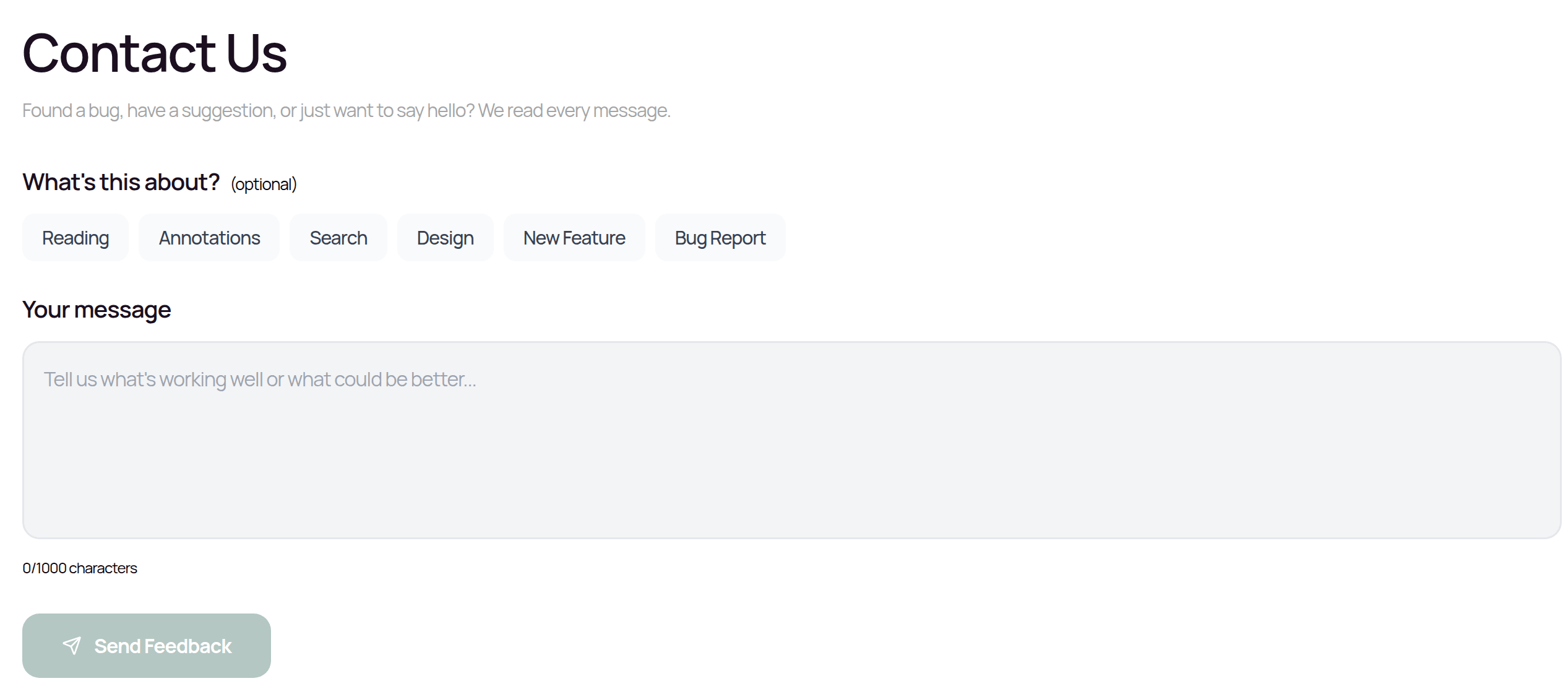
You need to be signed in. There are three places:
- —While reading or in a notebook: open More actions and tap Give us Feedback. The Quick feedback box opens.
- —Desktop/tablet dashboard: click Contact Us in the left sidebar.
- —Phones: tap Profile, then the Contact tab.
Then:
Optionally choose a topic: Reading, Annotations, Search, Design, New Feature or Bug Report.
Type your message (up to 1000 characters).
Tap Send Feedback. You'll see a thank-you message.
Your message is sent with your account email and the page you were on, so the team can reply. The contents of your notes are not sent.
Tips for a quick answer
Include your device and operating system, the app version, what you were doing, what happened, and what you expected. Attach a screenshot if you email.
Other help
- —The Support page at app.qurannotate.com/support has contact details and a few common questions.
- —The desktop app's Help menu links to qurannotate.com.
- —There is no public status page. If something seems down for everyone, email us.
Related Articles
Was this helpful?
Ready to annotate the Qurʼān?
Qurannotate is free to start — no sign-up required on web.